
Appingine
Let's Discuss Your Tech Solutions

Camilla Lawrance

 01/15/2025
Ever thought of what makes the application robust and successful at the same time? Well, the tech stack you choose for the app development is the answer to your questions, which directly affect the final product. Therefore, to succeed with your mobile app, it is necessary to make an informed choice that will help in forming a development approach with strong coding methods and, most importantly, an ideal technology stack.
The debate around Flutter vs Swift will always remain at the very forefront in modern app development. Because it is the programming language of choice, it has a direct impact on the quality of apps, the speed at which they are developed, and the degree of support that is available to satisfy business needs.
During the development of an iOS application, factors such as quality and performance, along with several App Store criteria, are considered. And by keeping this in mind, we have added some detailed comparisons between Swift and Flutter that will help you make well-informed decisions that bring skyrocketing success at your doorstep.
A powerful yet intuitive programming language that is primarily used to build applications for iOS devices while considering top quality as well as performance standards. As of 2026, Swift can also be useful in developing applications for Android and Windows while opening new doors for cross-platform development opportunities.
According to the Flutter documentation, it is a cross-platform UI toolkit that aims to enable code reuse across operating systems like iOS and Android.
This free, open-source platform is based on the object-oriented programming language Dart.
Dart and Flutter are both developments of Google that were released to developers in 2011 and 2015. Flutter lets you create two versions of your app at once. Since Flutter is not platform-dependent, it uses a single code to run on iOS and Android.
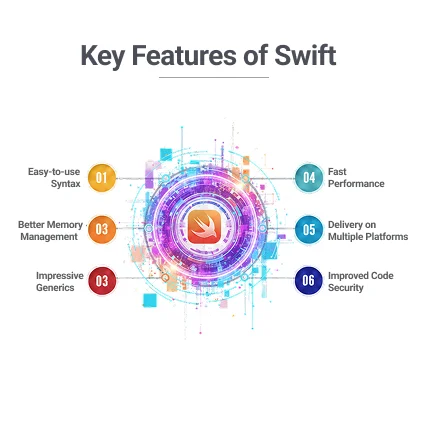
Swift has made app development faster, simpler, and more efficient by allowing developers to take advantage of the key features and functionalities listed below:
Easy-to-use syntax: The true meaning of syntax is simplicity and easy access, which Swift provides efficiently. Since Swift is a programming language, it is easy to code an algorithm or build logic with more rational code. It makes it easier for the developers to read and work through the code.
Better Memory Management: Working with the iOS elements gives supremacy to the development procedure as well as the end product. Though it was never easy with the earlier versions of the programming languages for iOS, including Swift, it is not anymore. The latest version of Swift offers excess memory space that is set automatically.
Impressive Generics: It is considered to be the best feature of a programming language, which allows you to reuse the function and flexibly handle the application.
Fast Performance: Swift automates the process, which means it is easy to build iOS apps using Swift. Now, developers can save their time by not investing it in testing the code and correcting the error.
Delivery on Multiple Platforms: There is no doubt about the compatibility because this language is suitable for any of the operating systems, which include Linux, macOS, and watchOS, apart from iOS.
Improved Code Security: Now, you don’t have to worry about the safety and security of the application. With Swift, you can check the code before proceeding to the production. Only the safety aspects will be released, and the base language will automatically eliminate the risky portions for runtime.
| Pros | Cons |
|---|---|
| can access the standard library that makes writing code efficient and fast | Not as mature as C# or C++, which means it lacks certain robust programming needs |
| Easy to maintain and comes with fewer errors | Not much stronger than other frameworks in the market. |
| Comes with automated memory management and auto code checks | Finding the right tools to develop apps can be difficult, since the market is evolving rapidly |
| Libraries used by code integrated upon app release | The Xcode framework may not support Swift iOS development |
| Open-source language offers strong community support and regular updates |
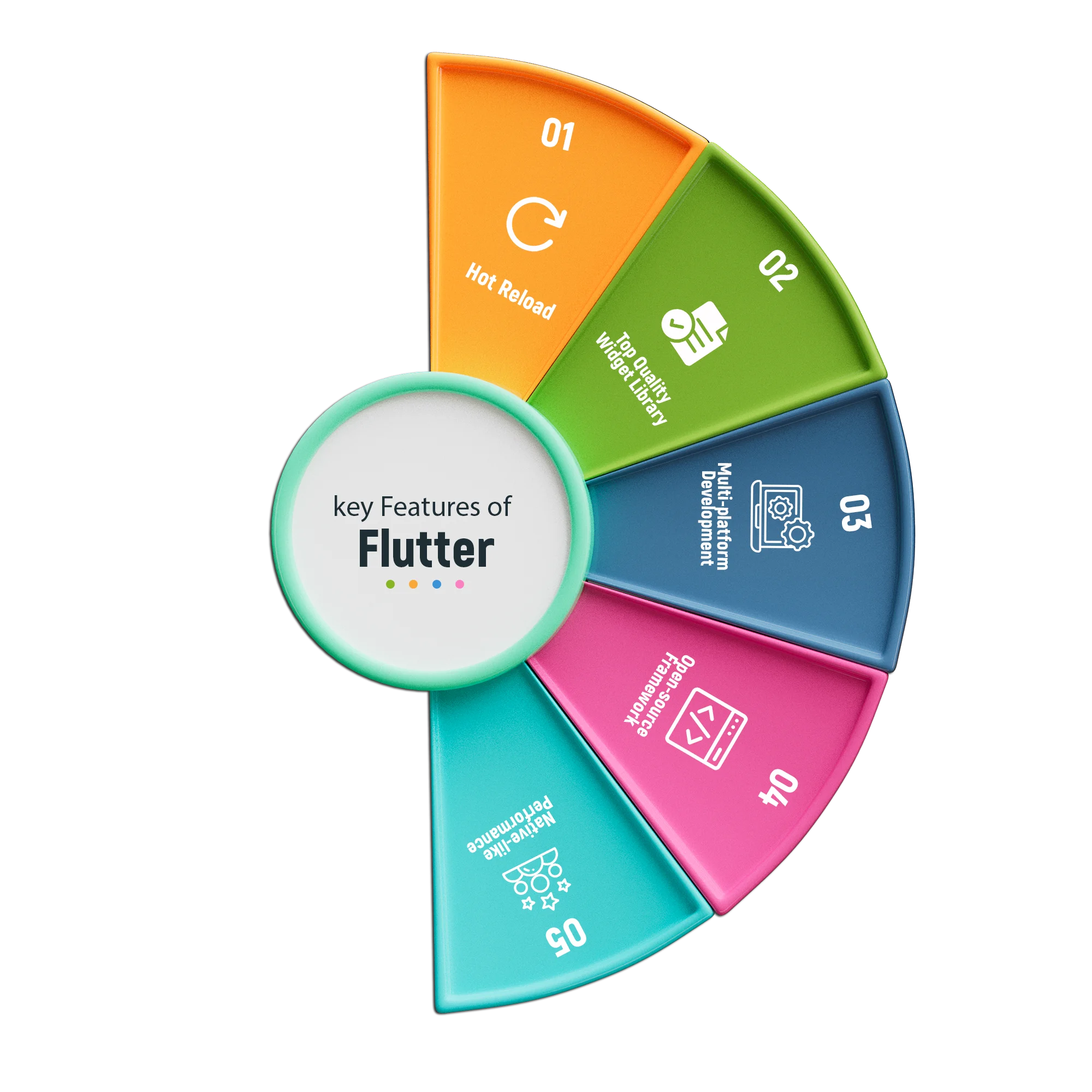
Since Flutter is a renowned UI toolkit that effortlessly develops cross-platform applications by using a single code base and several other features, these are:
| Pros | Cons |
|---|---|
| Accelerates development by reducing teams across multiple platforms | Flutter’s early stage limits immediate feature implementation |
| Hot reload allows live feature and functionality changes | The Android and iOS version updates may be delayed on Flutter |
| Layered architecture allows full control for customization | It may not get the exact look and feel of a native app |
| Flutter’s complete documentation enables smooth, guided development | There are no set guidelines (for design) when it comes to Flutter development |
After differentiating between iOS Swift vs Flutter, let’s dive deeper into it by comparing the insiders of both Flutter and Swift to help you identify the best according to your requirements and needs.
Since both of them, Flutter and Swift, are different technologies, Flutter is a framework, and Swift is a programming language that is mainly used for native-like iOS app development. To get deeper in the comparison between both technologies, let's break the ice by learning the basic difference.
Flutter supports cross-platform app development, which includes iOS, Android, web, and desktop, just by taking advantage of the single codebase, whereas Swift is restricted to the Apple ecosystem.
Due to Dart, Flutter may be a bit difficult to learn as compared to Swift, especially for the developers who are familiar with other programming languages such as JavaScript.
There is a wider range of the factors and components that can be compared; some of them are broken down for your ease:
1. It needs the development of the UI/UX of the application from the beginning.
2. To create application for multi-platform, iOS and Android, much time and resources will be needed
1. By utilizing the inherited widgets, developing UI/UX of the platforms, Android and iOS, have become easier
2. It combines with IDEs to allow smooth app development and deployment.
Flutter is efficient; therefore, you can create an application for iOS as well as Android with minimal effort. Not only that, but you can add more features over time if needed that will help compete in the market with maximum outcome.
In the same logic for coding, Swift allows reusing of the function but it does not allow reusability of the code and plugin to develop another platform.
Flutter is known for its reusability option for multiple platforms. Just create single codebase, and run through multiple platforms such as Windows, Android, Linux, and other platforms
Now creating web and mobile applications is no longer a difficult task. Because Flutter allows better reusability and app development while keeping the performance quality and app intent incredible.
According to the recent Stackoverflow report, only 4.65% of developers use Swift to program their app solution. Moreover, on GitHub, Swift has 55k stars with a popular developer community.
Flutter is regarded as one of the top three framework recommendations by Stackoverflow and on GitHub, it has 118k stars.
Flutter is unquestionably more popular for app development due to its superior UI capabilities, more documentation, and greater developer support. It enables programmers to simultaneously develop apps for several platforms.
It takes more time than Flutter to develop an application when the error and bug fixing reflects.
By using built-in widgets and tools, flutter allows you to develop an app real quick and you can add new features easily. As compared to native languages, Swift, stutter syntax allows users to build apps by writing code in fewer lines.
While comparing both technologies, as a result, building an app with flutter is much more efficient and less time taking than Swift. Because most of the heavy lifting is done by Swift in case of iOS app development.
A good number of native-app developers are available in the market.
It is not very popular among the developers. Therefore, you will find fewer dart developers who are available to develop a Flutter app.
Swift is a slightly more mature technology than Fast or Flutter, so it is easier to find the Swift iOS developer if you are planning to go for the native app development.
For unit, performance, and other app testing needs, Swift makes use of Apple's XCTest testing framework.
Flutter ensures that the code is easy to read and clear. Fast and simple testing is made possible by an integrated testing framework. The framework contains all the features you need to do load or unit testing.
Both of the technologies are available with the excellent testing capabilities that ensure top quality and performance of the app solution.
To keep data safe and secure, Apple recommends using Swift, which offers robust security measures and compliances.
The community is free to will its way into the source code because it is open-source and has fewer rules.
When it comes to security and protection, syntax with Swift takes over the market. Since it is driven by Apple guidelines, that is why making changes to its features and functionalities is not a piece of cake.
While following the latest version update, Swift streamlines the coding accordingly.
It is not easy for the framework to update immediately with the version update.
If you want instant updates and better upgrades, hire a Swift developer for your next application.
| Swift | Flutter |
|---|---|
| SlideShare | Google Ads |
| Square | |
| Eventbrite | Alibaba |
| eBay |
| Aspect | Flutter | Swift |
|---|---|---|
| Platform | Cross-Platform | Apple Ecosystem, |
| UI | Widget-based | Native UI Components |
| Development | Single code-base for multiple platform | Native iOS/macOS app development |
| Learning Curve | Moderate | Require Swift Expertise |
| Performance | Mostly Good | Optimized for high performance |
| Community | Growing community | Strong Apple ecosystem |
| Maintenance | Easier updates across platforms | Complex updates across the platform, since it is separately coded. |
| Use Cases | Cross-platform apps, MVPs, prototype | High-Performance native iOS/macOS apps |
Because Swift only supports iOS and takes additional resources, time and effort to develop an application for other platforms like Android, it typically requires a greater budget. However, by offering a single codebase for both iOS and Android, Flutter lowers development time, team size, and development costs. Even though Swift may offer better platform-native performance, Flutter is usually the more cost-effective choice if you want to develop cross-platform apps.
Looking for an iOS app development technology? Worry no more, because Appingine is here for your service. Or experts provide an ideal recommendation that can make or break your project’s success. Moreover, we evaluate each project based on performance, cost, timeline, and scalability, which helps in providing an exceptional user experience.
Swift supports app development for iOS only, but Flutter can be utilized for cross-platform app development. Flutter offers more dependable and robust app solutions. If you wish to provide solutions for the Apple range for iPhone, iPad, or other Apple devices, Swift is the best choice. However, if you want to produce high-performing apps, you can get your hands dirty with Flutter.
Flutter, on the other hand, is a cross-platform framework that allows you to build apps for multiple platforms, including a wide range of iOS, Android, web, and desktop platforms, by using a single codebase. If you are looking for an option to build an app faster, cost-efficiently, and with a consistent UI across multiple platforms, without compromising on user experience, then Flutter will be the best pick for your project.
At Appingine, we consider factors like project complexity, maintenance requirements, and long-term scalability before deciding between Swift and Flutter.
It is crucial to make the right choice between Flutter or Swift, and Appingine is here to guide you every step. Whether you are focusing on high performance or cross-platform development, our experts ensure that your project perfectly fits with your business goals, timeline, and budget as well. With our recommendation and experience, your app will not only deliver exceptional performance and a seamless user experience but also reach your users to set the stage for long-term success.
By hiring our iOS and Flutter app developers you just need to relax and let us cover all the hassle of deciding between the tech stack & developing your app.
Discuss Your App IdeaSwift is a programming language used for native app development only for iOS, while Flutter is a cross-platform UI framework that allows you to build apps for iOS, Android, web, and desktop using a single codebase.
Swift is the preferred choice for high-performance native iOS apps which offers deep integration with the Apple ecosystem, robust security, and seamless user experience.
Yes, Flutter allows developers to create apps for multiple platforms, including iOS, Android, web, and desktop, all from a single codebase, which reduces development time and cost.
Appingine evaluates each project based on factors like performance, cost, timeline, and scalability. Our experts provide customized recommendations to ensure the technology choice aligns with your business goals and project requirements.
Flutter is generally more cost-effective for cross-platform apps because it allows a single codebase for multiple platforms, reducing development time, team size, and overall cost. Swift may require more resources if targeting platforms beyond iOS.

Tel: +1 (800) 453-1297
Email: [email protected]
Main Office:
4929 Wilshire Blvd, Los Angeles, CA 90010
© 2026 Appingine. All Rights Reserved.
