
Appingine
Let's Discuss Your Tech Solutions

Camilla Lawrance

 02/26/2026
Just like every other application, there are frameworks for developing a video game with attractive visuals and physics. There are many available frameworks in the market of game development, and selecting the right one with the best capabilities and flexibility can be challenging.
When developing a video game, it's more about adventure and engaging storytelling with jaw-dropping graphics. Therefore, the best engine for mobile games offers a life-changing experience for the player and developer with some plot twists. Now, what could these plot twists be? Well, a game engine doesn’t just power the game you develop but also smooths the app's run, reduces development time and how much you will spend or earn; your chosen game engine builds the foundation of your app's success.
Before we jump in, let’s have a look at what’s hiding behind the curtains and get a clear picture of what a game engine actually looks like.
Ready to turn your idea into a fully enjoyable experience? Our experts guide you from the beginning to the end by helping you choose the perfect engine with accelerated development up to 40% faster.
Book a Strategy Call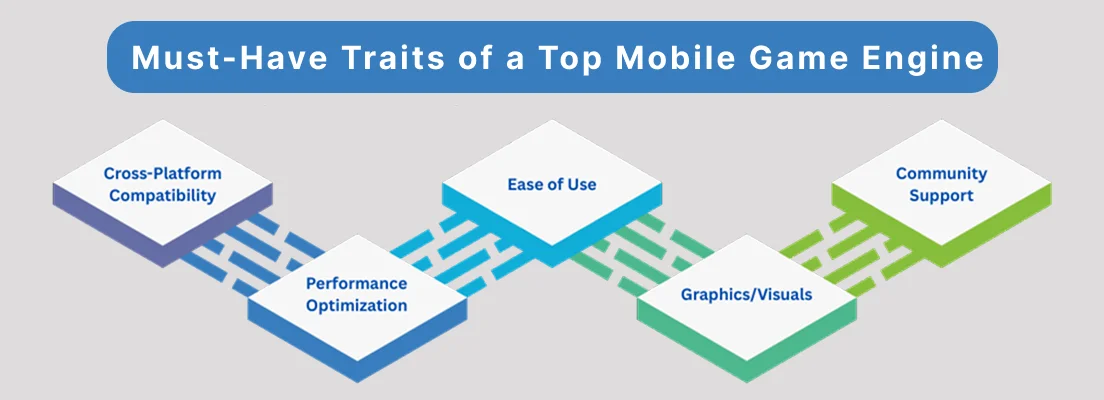
Here are some of the key traits listed below that can significantly affect the decision you will make, that can potentially make or break your game development idea.
A great game should deserve to be felt and played beautifully, also guide you and support your creativity. Therefore, ensure that the game engine you have chosen is able to work smoothly on any platform.
It is important to keep mobile performance in mind while developing a game to ensure smoother experience. Moreover, it allows you to control FPS with ease and lightweight build sizes. This way, it will help your video game install and run faster across multiple platforms.
It doesn’t really matter if you are a new or a pro developer; the idea of the game app should be easy to use. Therefore, choose what helps you build a user-friendly interface with the help of guidelines as well as advanced tools.
Whether you’re crafting a 2D side-scroller or diving into an immersive 3D adventure, be it 2D iOS game engines or the leading 3D game engine, choosing the right engine is crucial for the graphics & visuals. Why? Because it can make a huge difference in creating visuals to pop up and let the world feel alive.
A supportive community is a game-changer for the developers. How? With fellow developers, you will never feel alone and stuck, thanks to effective guidelines, tutorials, and troubleshooting hacks. Also you will be getting real-time valuable feedback from your fellow community.
Also Read: Top Tech Advances in Gaming Technology
Whether you are a project owner or a developer looking for the best game engine, here’s a breakdown that makes it easy to choose the best one that fits your vision and long-term goals. Are you excited to make a confident choice that brings your creative game idea to life?
When it comes to game app development, multiple game engines can be considered, and each comes with its own unique elements and tools. These game engines highly depend on your game type, experience level, and app goals. We have listed a breakdown of the engines that excel in game development.
If you are new to developing, then start with the most popular one, which is Unity. What does unity bring to the table? Unity offers a huge asset store filled with libraries and tools, and a large community support. It is the perfect choice for developers looking for game development for multiple platforms such as Android, iOS, and beyond.
| Pros | Cons |
|---|---|
| Includes features like Logcat integration, direct profiling, and Visual Studio debugging. | Feature-heavy editor and reliance on C# can be complex for beginners. |
| Flexible FPS control, great for performance optimization and resource usage. | Despite many resources, some tasks and editor features can be frustrating to learn. |
| Widely supported by third-party tools, integrations, services, and plugins. | May redraw the screen unnecessarily in static games, causing higher battery usage. |
Unreal Engine is one of the finest game engines that works best for 3D games, because it delivers graphics and visuals that are not just attractive to human eyes but keep them engaged for a long time on the platform by giving them an unreal experience in return.
What more is Unreal Engine capable of? Well, it optimizes game performance and helps games run smoothly across multiple devices. Not only is this engine scalable for games, but it also serves in movies. Film world editors utilize their expertise in creating animated movies, SFX, and virtual sets.
| Pros | Cons |
|---|---|
| The blueprint system means users don’t require extensive programming experience. | Its powerful tools might be excessive for small or casual games. |
| Cross-platform compatibility (mobile, desktop, and other platforms). | Unreal generally has fewer extensive mobile-focused resources and support. |
To provide a remarkable user experience, expert app developers or even new ones sometimes can get their hands on and decode Defold, which is considered a prime option in the game development industry. With the design weight of 1.83 MB on Android and 1.41 MB on iOS, it ensures that the game is being developed by utilizing necessary components.
What opportunities does Defold bring for beginners? By being the ideal choice for indie developers, Defold has thrived into multiple open-source projects since it is free to use and easy to learn.
| Pros | Cons |
|---|---|
| It’s free and easily accessible, as it uses Lua (an easy-to-learn programming language). | Still carries a reputation as “King’s engine,” which may put off some developers. |
| Excellent performance and small build sizes make it ideal for mobile game development. | Mainly suitable for 2D game development due to tool limitations. |
| Has a small but responsive team and a helpful online community (especially on Discord). | Has fewer third-party resources compared to Unity or Godot. |
GameMaker is another best 2D game engine that was developed by YoYo Games using in-house scripting language. This game engine is suitable for beginners and experienced developers alike. This engine brings an easy drag-and-drop interface as well as some good news for the fans: GameMaker Studio 2, which is its latest iteration, allows advanced export across multiple platforms.
| Pros | Cons |
|---|---|
| It can seamlessly export to various platforms for consistent gameplay across devices. | Developers unfamiliar with GameMaker Language may struggle with advanced features. |
| Its intuitive drag-and-drop interface is suitable for beginners and seasoned devs. | You need a paid license for cross-platform export. It can be a dealbreaker for indie devs. |
| Many tutorials, resources, and support outlets are available. | Only suitable for 2D game development, limiting its audience. |
A versatile game engine that has taken a reputable place in the industry over the past decade. Not only is it lightweight, but it's also perfect for 2D mobile games that work smoothly across multiple devices. It has been noted from the feedback of many developers that Godot’s workflow feels cleaner and more attractive.
| Pros | Cons |
|---|---|
| Intuitive node-based system that makes it easy to learn. | Missing features that support a wider variety of games with more complicated features. |
| High cross-platform compatibility and active support for resources/troubleshooting. | Might need extra optimization for performance-heavy mobile games. |
| Support popular programming languages like C++, C#, and Python. | Great for 2D games, but not the best fit for 3D. |
Without writing a single line of code, game developers can now easily bring their creative ideas to life. By utilizing Buildbox, developers are more focused on creativity rather than technical hurdles, which helps in offering intuitive interfaces.
| Pros | Cons |
|---|---|
| Very fast for prototyping and simple mobile games, you can quickly turn an idea into a playable prototype. | Not ideal for advanced or complex games or for projects requiring deep customization, graphics, or performance tuning, Buildbox can feel inadequate. |
| Includes many ready-made templates, assets, and built-in tools (menus, physics, monetization support, etc.), speeding up the development process. | Risk of “template-style” games: Because of reliance on presets, many games made with Buildbox can end up feeling generic or similar to existing ones. |
| No coding required, the drag-and-drop interface lets beginners build games without programming skills. | Limited flexibility, you may be constrained by what the templates and built-in tools allow. Custom or complex mechanics are harder to implement. |
Whether you’re building a fast-paced 2D game or a cinematic 3D world, our specialists offer game development services and help you achieve up to 3x higher user engagement.
Build Your Game App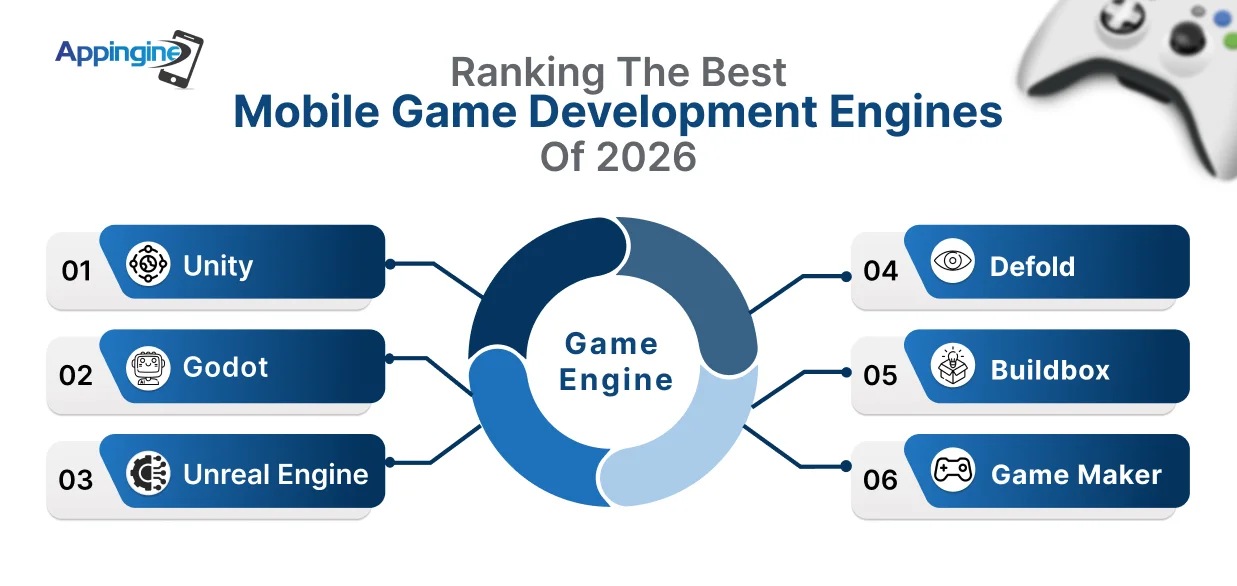
After examining different game engines along with multiple factors and components, here is the conclusion for your easy selection. Ultimately, Unity is considered to be the best choice in the game development industry, which is great for multiple platforms such as Android, iOS, and cross-platforms. If we look into other factors on the basis of performance optimization and intuitiveness, then Unity and Defold are reputed for their attractive interfaces and active community support. While comparing both Unity and Unreal Engine, we can say on the basis of performance and high-quality graphics, both are considered to be the best engines for mobile games. Here is a quick look for you to decide the best mobile game engine:
| Game Engine | Supported Platforms | Top Mobile Games | 2D/3D | Best for… |
|---|---|---|---|---|
| Unity | iOS, Android, Windows, macOS, Linux, WebGL, PS5, Xbox, Oculus, Nintendo Switch | Marvel Snap, Genshin Impact, Monument Valley, Pokémon Go | Both | Beginners, experts |
| Godot | iOS, Android, macOS, Windows, Linux, Nintendo Switch, HTML5 | Brotato, Usagi Shima, Slay the Spire II | 2D (Limited 3D) | Beginners, indie devs |
| Unreal Engine | iOS, Android, Windows, PS5, Xbox, Oculus, Nintendo Switch, HTML5, Steam OS | Fortnite Mobile, PUBG Mobile, Life is Strange | Mainly 3D | Experts |
| Defold | iOS, Android, Windows, macOS, Linux, HTML5, PS5, Nintendo Switch | Family Island, Monkey Mart, Look, Your Loot! | 2D | Beginners |
| GameMaker | iOS, Android, Windows, macOS, PS5, Xbox XS, Nintendo Switch, HTML5 | Crashlands, Downwell, Katana ZERO | 2D | Beginners, experts |
| Buildbox | iOS, Android, Windows, macOS | Hyper-casual games (e.g., Color Switch clones) | 2D & Simple 3D | Beginners, indie devs |
With years of experience in game development, our experts guide you through effective tips and advice to help you make the right choice. It is overwhelming to rule the game development industry with countless game engines, features, and technical considerations which is why you should look at what our best mobile game app developers offer:
With our experience and market research, we don’t just help in picking a game engine for innovative game development but also in turning their creative ideas into playable, high-quality mobile games while avoiding pitfalls and hurdles that come their way.
Save development hours, cut down costs and ensure smooth performance across multiple devices with our 50% reduced development waste and 2X improvement in game stability.
Optimize Your Game AppWhen selecting a mobile game engine, consider cross-platform compatibility, performance optimization, ease of use, graphics capabilities, community support, and your team’s skill level. These factors directly affect development time, cost, and the player experience.
Unity, Defold, GameMaker, and Buildbox are the best engines for mobile games for beginners. They provide user-friendly interfaces, drag-and-drop tools, and a supportive community to help you get started quickly.
Yes. Game engines for mobile like Unity support both 2D and 3D games, while others like Unreal Engine excel in 3D, and GameMaker or Defold are ideal for 2D games. Your choice should align with the type of game you want to create.
Experts of companies like Appingine for game development in Chicago analyze your game type, technical requirements, and target platforms to recommend the most suitable engine. They also provide efficiency insights, creative support, and access to tutorials and communities to make your development journey smoother.
Yes! mobile game engines like Buildbox allow you to create mobile games without coding using drag-and-drop interfaces and prebuilt templates. This is especially helpful for beginners or indie developers focusing on creative game ideas rather than technical coding. However, you may struggle to optimize the game or publish it on the store which is why you should always look for a professional game development company.

Tel: +1 (800) 453-1297
Email: [email protected]
Main Office:
4929 Wilshire Blvd, Los Angeles, CA 90010
© 2026 Appingine. All Rights Reserved.
